Joining & Server Rules
New to PVE+? Start with Discord, your Xbox gamertag, whitelist approval, and staff help.
Your next run starts here. Find answers, plan your loot, explore two worlds. Survive. Build. Belong.
 TWO WORLDS. ONE COMMUNITY.
Guide matching happens on your device. Item lookup sends the search to DZPage; avoid personal details.
New to the server? Follow these steps, then learn the controls. Staff make the final decision on server access.
Start with Xbox controls, food, water and your first fire.
Learn the basics →Help finding PVE+ on Xbox ↗Look up an item, check possible spawns, or compare equipment. Standard DayZ data can differ from PVE+.
Start with the instructions, then calculate what to gather.
Confirm placement and server rules in PVE+ Discord before building.
Choose a terrain, plan a visit, or find your community trading post.
Search how-to guides, PVE+ server instructions, locations and item records in one place.
Catch up with the community, get help, or keep your next run organized.
Watch the PVE+ recruitment trailer.
Tap Play for sound. Use your phone’s media volume.
Press play to watch with sound. Open video ↗
Pick what you want to do. Read a how-to, open an illustrated guide, or copy its link for Discord.
Try a search · Chernarus
Choose a question below to search the published references in that manual.
New to PVE+? Start with Discord, your Xbox gamertag, whitelist approval, and staff help.
Know your buttons. Learn movement, combat, inventory, driving, voice, and controller setup.
Food, water, medical care, hazardous zones, and Badlands bunker radio guides.
Recipes, materials, construction, watchtowers, and equipment repairs.
Find useful databases, map tools, and building references. These describe standard DayZ data; PVE+ settings and staff rules can differ.
Browse weapons and ammunition, vehicles and parts, or crafting and building supplies. Open a record for its available stats, compatible equipment, loot information, and recipes.
Standard DayZ data, not live PVE+ inventory. Availability, recipes, and server rules can differ. No map-specific availability is inferred.
Loading the item database…
Find places with matching loot buildings on Chernarus or Nasdara. These are possible standard DayZ spawn locations, not guaranteed loot or live PVE+ inventory.
Choose a map and item to search.
Open DZPage loot map ↗Compare up to three weapons or vehicles side by side. Use the same type in each comparison.
Choose two or three weapons to start comparing.
Weapon values load from DZPage. This is a base-game stat comparison; armor, range, and hits-to-kill are not simulated.
Calculate base-building supplies or plan a Nasdara rebuild. Choose your stages, quantities, and stock to get a loot list and build order.
Loading construction data…
Reserve is optional and rounds up per material. Planned rubble salvage is deducted only for clearing stages that are not already complete.
Saved on this browser. Nothing is submitted to staff.
Material planning only: this does not validate placement, promise raid resistance, or grant a build or donation request. Confirm current PVE+ rules with staff.
DayZ updates, Bohemia studio news, and staff announcements. Check the platform label before applying a patch note to Xbox.
Loading official headlines…
Headlines link to their publisher. Source checks are cached for up to 15 minutes while the site is in use. Saved references are labeled when a live source is unavailable.
Ask a DayZ question or find guides, onboarding and community resources.
Source-backed answers for Chernarus and Badlands / Nasdara. Staff have the final word on PVE+ rules.Searching Chernarus + shared community resources.
Explore PVE+ location briefings for your selected terrain. Check the map label before planning a trip.
Choose a map here to view its PVE+ locations. The map selection is remembered on this device.
Briefings transcribed from supplied Discord posts. Check Discord for current loot, access requirements, and server rules. “Safe Zones” is a location name; its briefing describes dangerous abandoned relief sites.
LtPallin's Tactical Surplus Depot is a community center at Radio Zenith, with orientation, crafting help, and survivor-to-survivor trading.
Meet us on Discord ↗A trading place for peer-to-peer exchanges or trades with the market owner. Coordinate current offers in Discord’s trades-and-gifts channel.
Leave your exchange items, lock the locker, and privately share the combination with the other trader. After both sides finish, reset the locker to the shared default specified in Discord.
Temporary loot storage for new players searching for a permanent base. Contact LtPallin for check-in, check-out, stay limits, and parking instructions.
Use Discord for live availability and current house rules.
Explore the community archive. Open artwork at full size, zoom in, and keep your own scouting notes.
Select a marker to open its briefing and add it to your scouting plan.
Coordinate schematic from supplied community briefings. This is not a terrain map or a safe route. Only locations with supplied coordinates appear.
Chernarus maps and archived event artwork retain their original terrain labels.
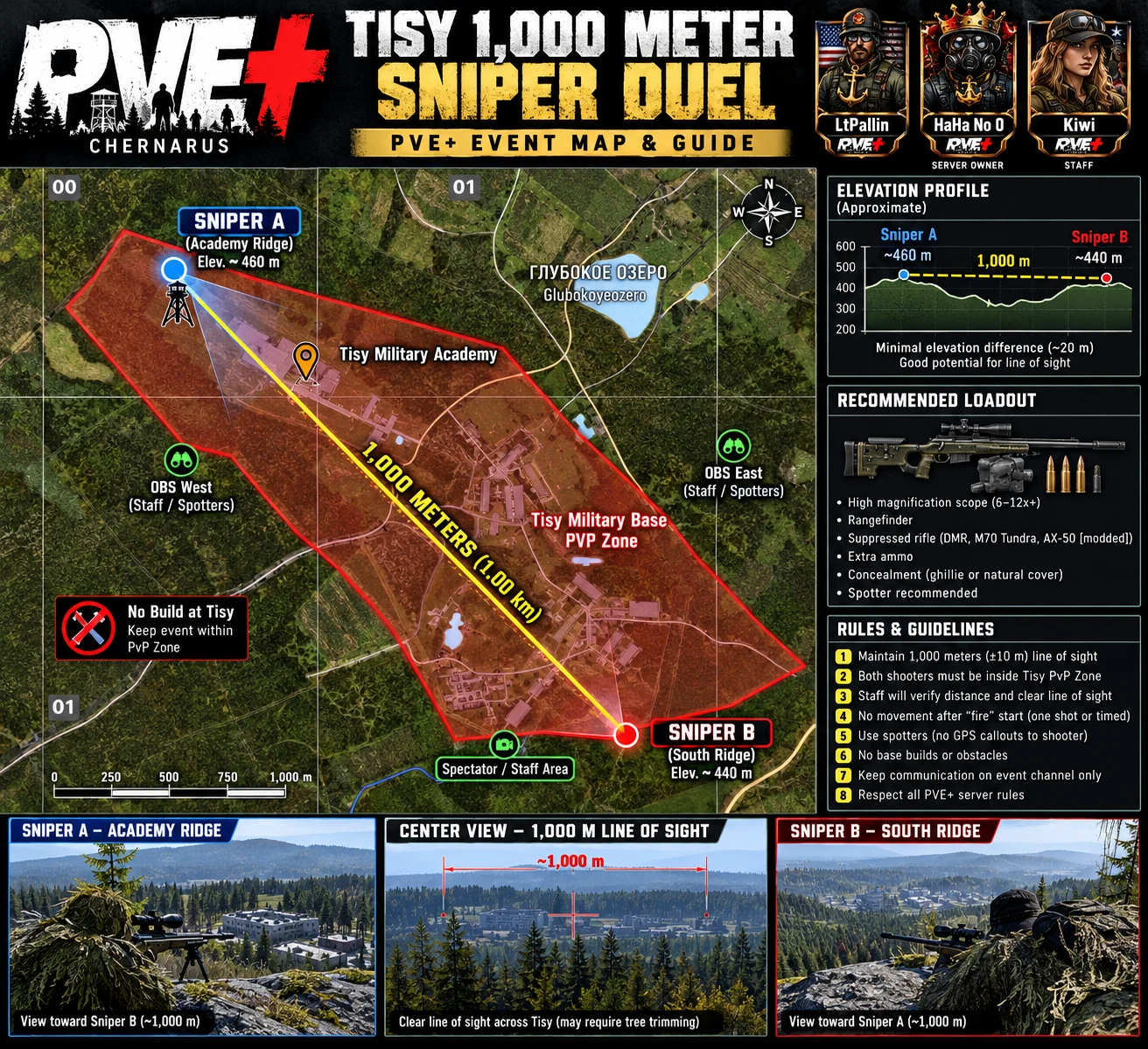
Community event artwork. Distances and sightlines need an in-game check before use.
Find member streams, YouTube channels, highlights, and PNN coverage. Published channels open directly on their platform.
Watch our community trailer while the verified channel directory takes shape.
Compare membership options and prepare a support enquiry. The $5 tier is a proposal for owner review; no purchase or recurring payment starts here.
Join the conversation and get established on PVE+.
Help sustain the community with a possible recurring option.
Ask staff for the current verified donation destination and terms. Your enquiry does not take payment or grant benefits.
Include your gamertag, request, and location. For placement requests, attach a Tourist Map screenshot and north, south, east, and west photos showing clear, level ground.
HaHa No 0’s final approval is required. Confirm pricing, availability, limits, and current server requirements with staff.
No gameplay benefit is promised by this site. Bohemia Interactive monetization information ↗
Saved guides, artwork, and locations. Bookmarks, notes, and scouting stops stay in this browser.